Creating a modern school website no longer requires advanced coding skills or complex tools.
With the help of AI, you can plan and design a complete responsive school website using only HTML, CSS, and Bootstrap.
In this tutorial-based project, I designed a one-page school website by using an AI prompt and then converting the generated structure into clean, working frontend code.
This approach is ideal for students, beginners, and frontend learners who want to understand real-world website layouts.
Why Use AI for School Website Design?
AI helps speed up the planning and layout process. Instead of starting from a blank page, you can:
-
Generate a professional website structure
-
Decide sections and layout flow
-
Maintain design consistency
-
Save time during the planning phase
AI does not replace coding skills — it supports them.
You still write, edit, and understand the HTML, CSS, and Bootstrap code yourself.
Technologies Used in This Project
This school website is built using basic and widely used frontend technologies:
-
HTML5 for structure
-
CSS3 for styling
-
Bootstrap 5 for responsiveness and layout
No JavaScript or backend code is used, making this project simple and beginner-friendly.
School Website Sections Included
The website is designed as a single-page layout with the following sections:
-
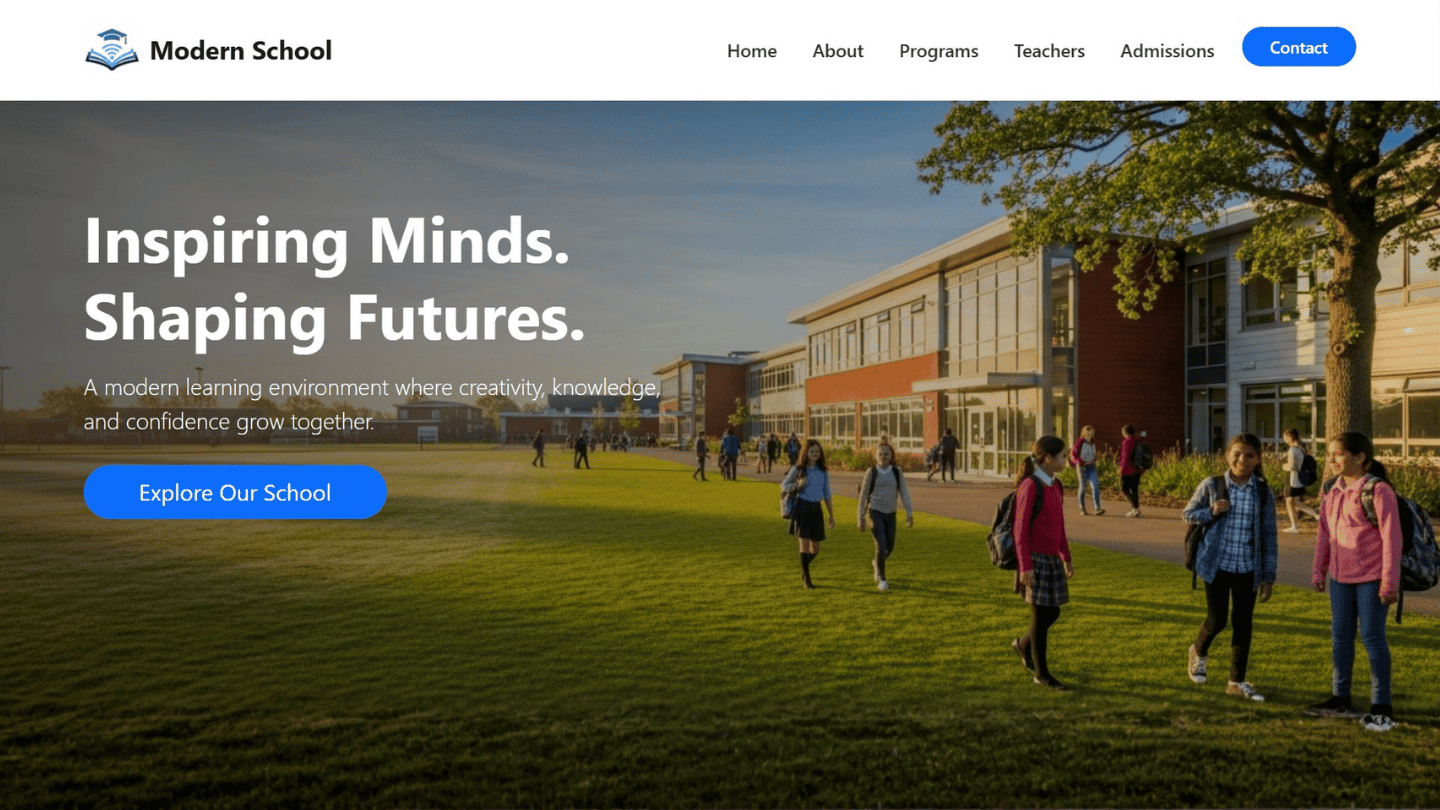
Header (Responsive Bootstrap Navbar)
-
Hero Section (School intro, tagline, CTA button)
-
About School
-
Courses / Programs
-
Teachers / Staff
-
Admission Process
-
Contact Section
-
Footer
Each section follows a clean structure and works well on mobile, tablet, and desktop screens.
AI Prompt Used to Design the Website
Below is the exact AI prompt I used to plan and generate this school website design:
Hello,
Create a modern, visually attractive one-page school website using HTML, CSS, and Bootstrap only.

The design should feel creative, stylish, professional, and suitable for a modern educational institution.

Technical Requirements:
- Use only HTML, CSS, and Bootstrap
- Keep HTML and CSS in separate files
- Make the layout fully responsive
- Maintain a visually balanced, modern design
- Use clean, semantic HTML structure

Image Instructions:
- Add proper <img> tags wherever images are required
- Use placeholder image paths such as:
images/hero.jpg, images/about.jpg
- Add short HTML comments ONLY for images, mentioning:
• what image should be added
• recommended size or aspect ratio
Example:
<!-- Add school building image here, 1200x700 -->
- Images will be replaced manually later

Output Rules (Strict):
- Do not include explanations, comments, or feedback
- Output only pure code
- Do not add any extra text outside the code

Step-by-Step Delivery Rule:
- Generate code for the FIRST section only
- Stop immediately after the first section
- Wait for further instruction before continuing
- Do not auto-generate next sections

Website Sections (Exact Order):
1. Header section (responsive Bootstrap navbar)
2. Hero section (school intro, tagline, CTA button, background image)
3. About School
4. Courses / Programs
5. Teachers / Staff
6. Admission Process
7. Contact Section
8. Footer

Follow all rules strictly.
For the first response, generate code for the FIRST section only.
This prompt helps control the output and keeps the generated code clean and usable.
Image Handling in the Project
All images in this project use placeholder paths such as:
Inside the HTML, short comments guide you about:
-
Which image to add
-
Suggested size or aspect ratio
You can replace these images later with real school photos without changing the layout.
Who Can Use This School Website Project?
This project is useful for:
-
HTML & CSS beginners
-
Students working on college projects
-
Frontend practice
-
Educational institutes
-
Teachers creating demo websites
-
Anyone learning Bootstrap layouts
It also works well as a portfolio project.
Free Source Code
I’m providing the complete source code used in this tutorial, including:
-
HTML file
-
CSS file
-
Bootstrap integration
-
Section-wise clean structure
Final Thoughts
Using AI with HTML, CSS, and Bootstrap is a smart way to learn modern web design workflows.
You still write the code, understand the structure, and control the design — AI simply helps with planning and creativity.
If you want more tutorials like this, keep following MaduWebTech for frontend, WordPress, and AI-based web design content.