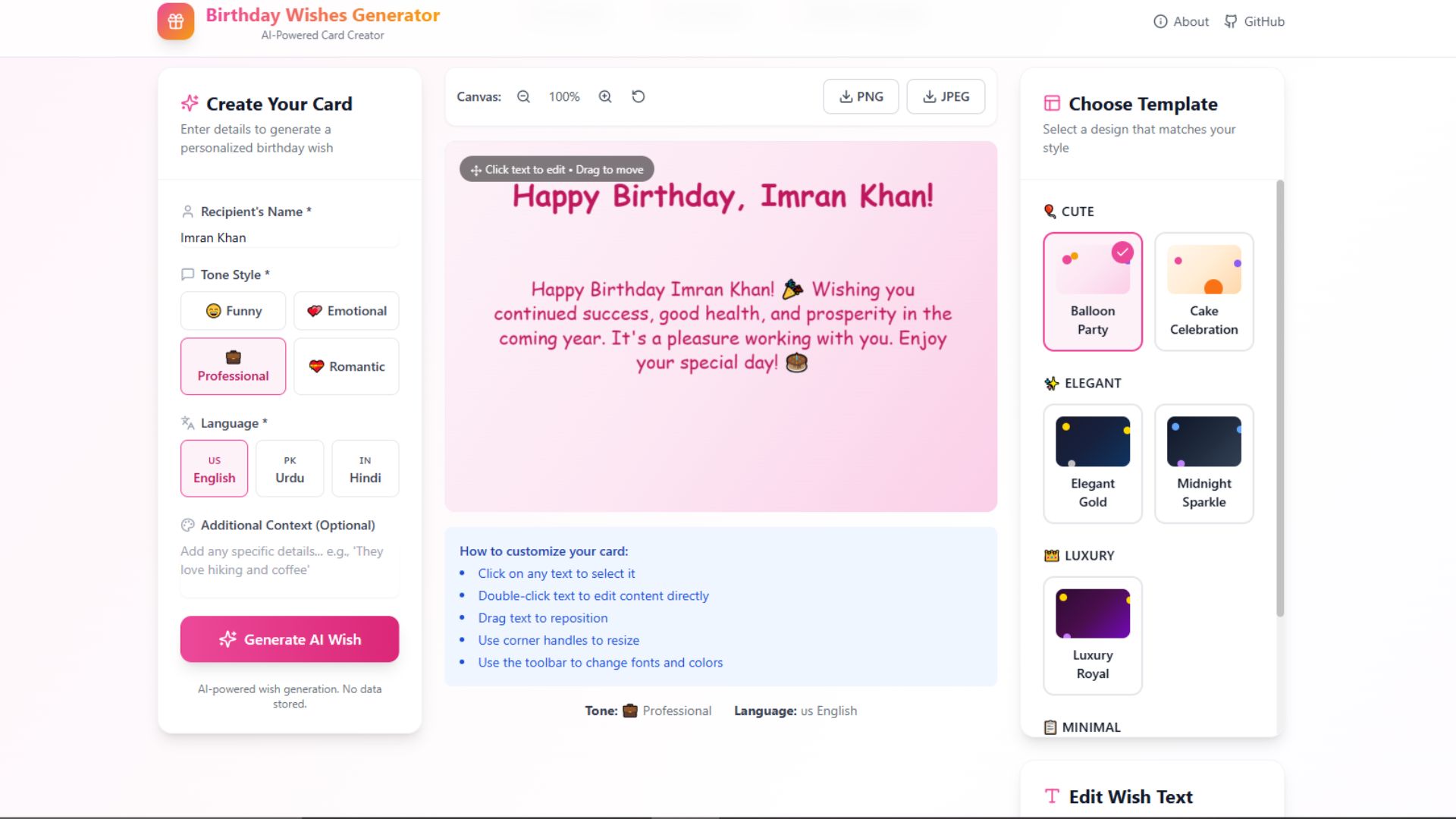
Creating personalized birthday cards manually takes time, especially when you want modern designs, custom wishes, animations, and downloadable images. In this tutorial project, I’m sharing a complete AI-powered Birthday Wishes Image Generator built with Next.js, TypeScript, Fabric.js, and OpenAI/Gemini integration.
The project is production-ready and includes editable templates, AI-generated birthday wishes, drag-and-drop text editing, image export, and multilingual support.
Download Source Code
Project Overview
This web application allows users to:
- Generate AI birthday wishes
- Create beautiful birthday cards
- Customize text, colors, and fonts
- Edit card layouts visually
- Export high-quality PNG/JPEG images
- Use OpenAI or Gemini APIs
- Work completely without a database
The system is built using a serverless architecture with Next.js App Router.
Features Included
AI Birthday Wish Generator
Users can generate birthday wishes based on:
- Recipient name
- Tone
- Language
- Custom context
Supported tones:
- Funny
- Emotional
- Professional
- Romantic
Supported languages:
- English
- Urdu
- Hindi
The app supports both:
- OpenAI GPT
- Google Gemini API
If no API key is added, the system automatically switches to fallback template-based wishes.
Editable Birthday Card Canvas
The project uses Fabric.js with HTML Canvas API for a fully editable experience.
Users can:
- Drag text
- Resize text
- Change font style
- Update colors
- Align text
- Move elements freely
Changes appear instantly in the live preview.
Prebuilt Birthday Templates
The project includes multiple animated templates including:
- Balloons
- Birthday cakes
- Confetti effects
- Decorative lights
- Minimal designs
- Luxury themes
Theme categories:
- Cute
- Elegant
- Luxury
- Minimal
High Resolution Export
Users can export birthday cards as:
- PNG
- JPEG
The export system generates high-resolution images suitable for:
- WhatsApp sharing
- Instagram stories
- Printing
- Social media posts
Tech Stack Used
Frontend
- Next.js 14
- TypeScript
- Tailwind CSS
- Fabric.js
- Framer Motion
- Lucide React
Backend
- Next.js API Routes
- OpenAI API
- Gemini API
Architecture
- Serverless
- No Database
- LocalStorage state persistence
Project Structure
birthday-wishes-generator/
├── app/
│   ├── api/
│   │   └── generate-wish/
│   │       └── route.ts
│   ├── globals.css
│   ├── layout.tsx
│   └── page.tsx
├── components/
│   ├── CanvasEditor.tsx
│   ├── InputPanel.tsx
│   ├── TemplatePanel.tsx
│   └── TextEditor.tsx
├── lib/
├── types/
├── package.json
└── tailwind.config.ts
How to Run the Project
1. Clone Repository
git clone https://github.com/maduwebtech/birthday_card2. Open Project Folder
cd birthday_card3. Install Dependencies
npm install4. Configure Environment Variables
Create a .env.local file:
OPENAI_API_KEY=your_openai_key
GEMINI_API_KEY=your_gemini_key
AI_PROVIDER=openai
5. Run Development Server
npm run devOpen:
http://localhost:3000How the System Works
The application flow is simple:
User Input → AI API → Generated Wish → Editable Canvas → Image ExportUsers first generate AI wishes, then customize the birthday card visually before downloading the final image.
Main Components Explained
CanvasEditor.tsx
Handles:
- Drag-and-drop editing
- Canvas rendering
- Text positioning
- Live updates
Uses Fabric.js for interactive editing.
InputPanel.tsx
Handles:
- Name input
- Tone selection
- Language selection
- Custom prompts
TemplatePanel.tsx
Displays available birthday templates and themes.
TextEditor.tsx
Allows users to:
- Modify AI-generated text
- Change typography
- Adjust alignment
- Update colors
Why This Project is Useful
This project is excellent for developers learning:
- Next.js App Router
- AI API integration
- Fabric.js
- Canvas-based applications
- Serverless architecture
- SaaS-style frontend systems
It can also be expanded into:
- A paid SaaS platform
- Event invitation generator
- Greeting card business
- Festival wishes generator
- Social media content tool
Deployment
The project is optimized for deployment on:
- Vercel
- Netlify
- VPS servers
For Vercel:
- Push project to GitHub
- Import repository
- Add environment variables
- Deploy
Customization Ideas
You can extend this project by adding:
- User authentication
- Database storage
- Premium templates
- QR codes
- Voice birthday wishes
- Sticker libraries
- Video exports
- AI image generation
Final Thoughts
This is a complete modern AI project that combines:
- Next.js
- TypeScript
- AI APIs
- Interactive canvas editing
- Image processing
If you want to learn how modern AI web apps are built, this project is a strong practical example.