Hey there, fellow developers and tech enthusiasts! 👋
I’m excited to share something special with my subscribers today. As a thank you for being part of the MaduWebTech community, I’m providing free access to the complete source code of my personal portfolio website. This is a fully functional, modern web application that you can use as a template for your own portfolio or study to learn advanced web development techniques.
What Is This Project?
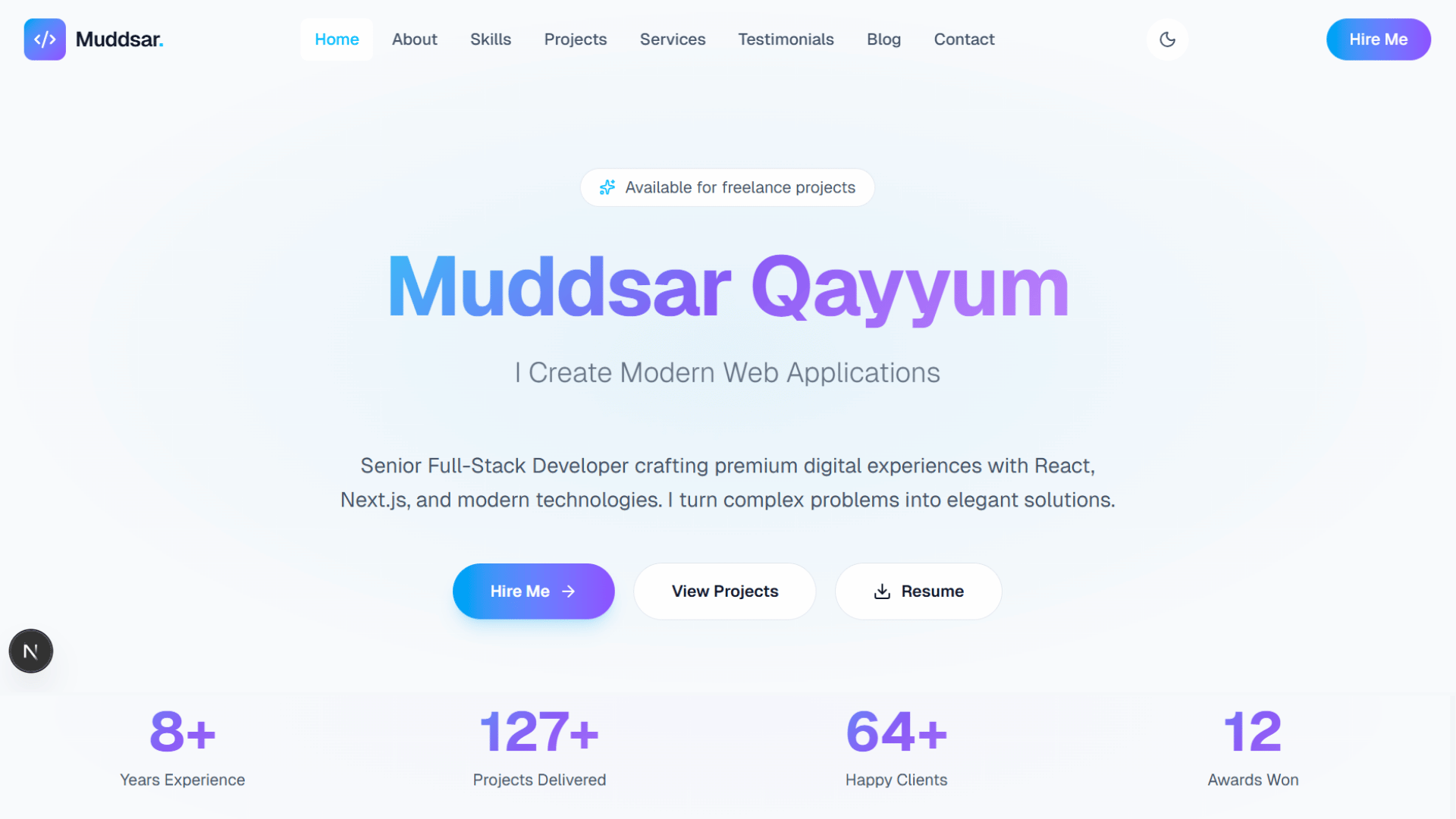
This is a professional portfolio website designed for a Senior Full-Stack Developer. It showcases work experience, skills, projects, services, testimonials, and provides an easy way for potential clients to get in touch. The website features:
- Responsive Design: Looks great on all devices (desktop, tablet, mobile)
- Modern UI/UX: Clean, professional design with smooth animations
- Multiple Pages: Home, About, Skills, Projects, Services, Testimonials, Blog, Contact
- Interactive Components: Animated hero section, stats counter, project showcases
- Performance Optimized: Fast loading times and smooth user experience
- SEO Friendly: Proper meta tags and structured content
Technologies Used
This portfolio is built using cutting-edge web technologies:
Core Framework
- Next.js 16.2.4 – React framework for production
- React 19.2.4 – UI library
- TypeScript 5 – Type-safe JavaScript
Styling & UI
- Tailwind CSS v4 – Utility-first CSS framework
- Class Variance Authority – Component variant management
- Tailwind Merge – Conditional class merging
- Geist Font – Modern typography from Vercel
Animations & Interactions
- Framer Motion 12.38.0 – Production-ready motion library
- GSAP 3.15.0 – High-performance animation library
- Three.js 0.184.0 – 3D graphics library
Icons & Utilities
- Lucide React – Beautiful icon library
- clsx – Conditional CSS classes utility
Development Tools
- ESLint – Code linting
- PostCSS – CSS processing
Project Structure Overview
The project follows Next.js 13+ App Router structure:
portfolio/
├── app/ # Next.js app directory
│ ├── globals.css # Global styles
│ ├── layout.tsx # Root layout
│ ├── page.tsx # Home page
│ ├── about/page.tsx # About page
│ ├── blog/page.tsx # Blog page
│ ├── contact/page.tsx # Contact page
│ ├── projects/page.tsx # Projects page
│ ├── services/page.tsx # Services page
│ ├── skills/page.tsx # Skills page
│ └── testimonials/page.tsx # Testimonials page
├── components/ # Reusable React components
│ ├── hero.tsx # Hero section
│ ├── navbar.tsx # Navigation
│ ├── footer.tsx # Footer
│ ├── stats-section.tsx # Statistics display
│ ├── featured-projects.tsx # Project showcase
│ └── … (more components)
├── lib/ # Utility functions and data
│ ├── data.ts # Static data and content
│ └── utils.ts # Helper functions
└── public/ # Static assets
Key Features Explained
1. Hero Section
- Animated text rotation showing different roles
- Call-to-action buttons
- Smooth scroll animations
2. Stats Section
- Animated counters for experience, projects, clients, awards
- Intersection Observer for triggering animations
3. Featured Projects
- Grid layout showcasing key projects
- Hover effects and smooth transitions
- Links to live demos and GitHub repos
4. Services Preview
- Overview of offered services
- Pricing information
- Contact links
5. Testimonials
- Client reviews and feedback
- Star ratings
- Carousel/slider functionality
6. Contact Section
- Contact form
- Social media links
- Direct contact information
How to Download the Source Code
To get your hands on this portfolio source code:
- Subscribe to MaduWebTech (if you haven’t already)
- Download the ZIP file or clone from the provided repository (https://github.com/maduwebtech/webdev)
- Extract the files to your preferred directory
The download includes:
- Complete source code
- All dependencies listed in package.json
- Configuration files
- README with setup instructions
How to Run This Project on Your Local PC
Follow these simple steps to get the portfolio running locally:
Prerequisites
Make sure you have the following installed:
- Node.js (version 18 or higher) – Download from nodejs.org
- npm or yarn or pnpm (comes with Node.js)
- Git (optional, for cloning repositories)
Step 1: Install Dependencies
Open your terminal/command prompt and navigate to the project folder:
cd portfolio
npm install
This will install all the required dependencies listed in package.json.
Step 2: Run the Development Server
Start the development server:
npm run dev
Step 3: View the Website
Open your browser and go to http://localhost:3000
You should see the portfolio website running locally! The development server supports hot reloading, so any changes you make to the code will automatically update in the browser.